
Late Texts Configuration
Overview
Batch scheduling allows is used as an automated system, for example caregivers can be texted if they fail to check in on a timely basis for their visits. Also, admin can be texted when the caregiver is late to check in or out.
In order to set up batch scheduling of messages, there are usually 3 key aspects:
- Set up the phone numbers or emails for the appropriate parties (caregivers, admins) & check the visit reminder box within the caregiver/admin profile
- Set up the appropriate Batch Scheduling option under Settings (this can be requested through suport@ankota.com)
- Wait a day for it to kick in & then try out the feature
Note: The first 25 text messages per client are free of charge at Ankota; after this there is a standard billable rate (please inquire for current pricing). Please note caregivers may be subject to SMS fees by their cellular provider depending on their plan.
To learn more on how to send texts to caregivers from the Caregiver Page select Send Texts to Caregivers.
See below for the following sections:
Send Late Email/Texts to Admin
Send Late Departure Text to Worker
Admin Texts/Emails
Late Visit Closure
This feature sends notifications to any person(s), usually admins, with listed phone numbers of late closure of any visits.
Send Late Email/Texts to Admin
This sends late visit texts with Worker's name to admins. We also have a new option to select a late notice email instead of text (although this is rarely desired).
The message will read (for both SMS + Email):
- Subject: {Worker Name}
- Message: {WorkerName} has not clocked in for their visit with {PatientName} that was expected to start at {ExpectedArrivalTime}.
In order to add administrator number to the list:
- Select Settings
- Batch Scheduling
- Select the Book icon next to Send Late Tests to Admin
- Select Add SMS Number
- Add phone number (Ex:1234567899)
To Add Admin Email:
- Select Message Type: Email
- Enter email addresses (separate by comma)
Texts to Worker
Late Visit SMS
Some customers want late visit texts for arrival to go out to caregivers. We also have a new option to select a late notice email instead of text (although this is rarely desired). This will text caregivers if they are late to clock IN and Out but only Once. For example: if the caregiver is late upon arrival, there will be no text for late on departure.
Send Late Departure Text to Worker NEW
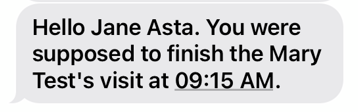
Some administrators want late visit texts for departure only to go out to caregivers.This will send a late text reminder after an X amount of minutes from the scheduled departure duration. Please note you must have the Visit Reminder box checked on the caregiver's profile next to the caregiver's phone number.
Note: If caregiver/admin send text back STOP, the texts will no longer send to this caregiver/administrator. Go back to the text message last sent, reply START.